
ASRock Motherboard Micro ATX DDR3 1066 NA D1800M
4.0Editor score
Intel J1800 Dual Core Processor
Micro ATX Form Factor
Multiple USB and Video Ports
This guide compares the top low power motherboard options for energy efficiency and performance in NAS home servers and compact systems.
Finding the right low power motherboard is essential for building energy efficient systems that run quietly and coolly. Whether you need a home server or a compact office PC these boards save electricity and reduce heat.
We evaluated ten top models based on power consumption thermal design and feature sets. Our analysis covers industrial NAS boards and consumer options to help you choose the best fit for your specific needs.
Each pick highlights key strengths and trade-offs so you can decide quickly. Prices and availability change frequently so verify details before purchasing to ensure you get the best value today.
4.0Editor score

4.5Editor score

4.1Editor score
Below is a side by side comparison of all ten products covered in this guide. Review the specs and ratings to find the right match for your build goals.




This industrial NAS motherboard delivers strong value with a low power Intel Celeron N5105 processor. It earns a 4.5 rating for its reliable performance and excellent connectivity options suited for home labs.
We may earn a commission when you buy through this link, at no additional cost to you.
The standout feature is the four 2.5GbE network ports that enable fast and stable connections for network security or multimedia use. Six SATA ports and two M.2 NVMe slots provide plenty of storage expansion.
The only notable trade off is the requirement for both 24PIN and 4PIN power connections which adds complexity during setup. Boot times can also be slower when reading memory information initially.
Buyers needing a compact NAS or firewall appliance should choose this board for its balanced specs and low TDP design. It remains the top pick for professional use cases.
Four 2.5GbE ports allow advanced networking setups like VLANs or link aggregation for superior throughput.
With six SATA ports and two M.2 slots you can mix traditional HDDs and fast NVMe SSDs easily.
We may earn a commission when you buy through this link, at no additional cost to you.
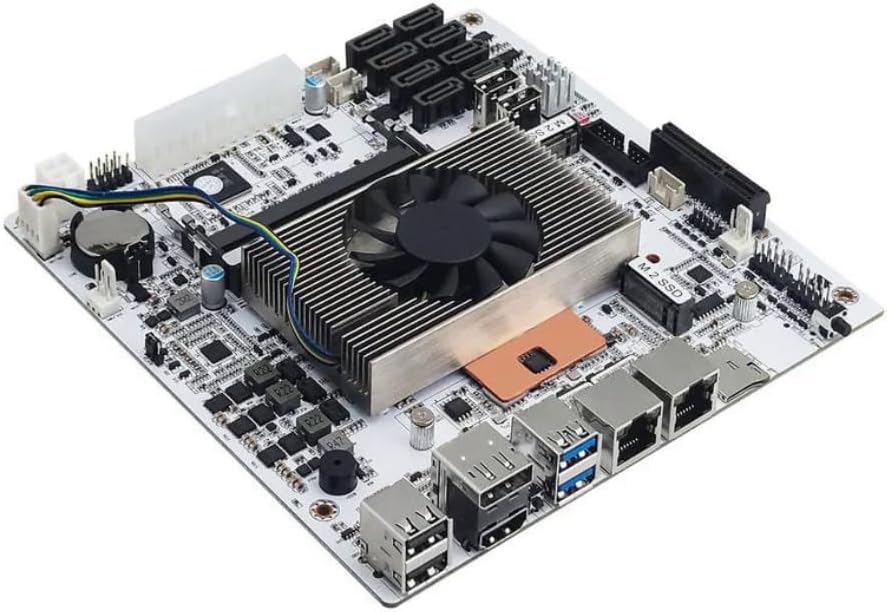
This budget friendly Micro ATX board features an Intel J1800 dual core processor ideal for basic tasks. It receives a 4.0 rating for its simplicity and low cost for lightweight computing needs.
We may earn a commission when you buy through this link, at no additional cost to you.
Key strengths include three video outputs and multiple USB ports which support diverse peripheral setups. The low power draw makes it perfect for compact systems that run continuously.
However the DDR3 memory support and older PCIe slots limit modern performance potential. Users looking for high speeds will find it outdated compared to newer boards.
For basic office or home use this board offers great value. Choose it when your budget is tight and performance needs are minimal.
HDMI DVI and VGA ports allow connection to almost any display for office or media tasks.
Micro ATX design fits small cases while still providing essential expansion slots and ports.
We may earn a commission when you buy through this link, at no additional cost to you.
This premium Mini ITX motherboard offers powerful performance with an 8th generation U-series processor and eight SATA ports. It gains a 4.1 rating for its industrial quality and virtualization features.
We may earn a commission when you buy through this link, at no additional cost to you.
The dual 2.5GbE LAN ports and eight SATA connectors make it excellent for NAS or firewall appliances needing high throughput and storage capacity. It supports virtualization with VT-x and VT-d.
Potential drawbacks include a known sleep mode bug and a fan cooler that might produce noise. First boot can also take time to read memory information.
Users building a professional server or advanced NAS should consider this board for its robust specs. The high connectivity outweighs minor bugs for demanding workloads.
The 8 thread processor handles virtual machines and multiple services efficiently without overheating.
High density PCB and moisture resistant materials ensure reliability in demanding environments.
We may earn a commission when you buy through this link, at no additional cost to you.
This Micro ATX board supports Ryzen 5000 series CPUs with a reliable B550 chipset. It scores 4.4 for offering PCIe 4.0 and strong compatibility at a reasonable price.
We may earn a commission when you buy through this link, at no additional cost to you.
Key strengths include the upgraded power delivery and M.2 slots that provide modern performance without excess power draw. It suits small form factor builds needing GPU support.
However the VRM is basic and limits overclocking headroom compared to higher end boards. Users seeking high performance overclocking may want more robust power phases.
For standard Ryzen builds this board offers great efficiency. Choose it for balanced performance and cost in compact systems.
Supports fast NVMe SSDs and next gen GPUs for improved system responsiveness.
Q-Flash allows easy BIOS updates without needing a CPU installed.
We may earn a commission when you buy through this link, at no additional cost to you.
The PRO B550M-P features MSI Core Boost and AI cooling for stable performance. It scores 4.4 for its effective passive cooling and PCIe 4.0 support in a compact size.
We may earn a commission when you buy through this link, at no additional cost to you.
Its strengths include high memory speed support and dual M.2 slots that enable fast storage configurations. The passive chipset heatsink reduces noise levels significantly.
However it lacks USB 3.2 Gen2 ports and has limited front headers which can restrict peripheral options. Buyers needing many front ports may look elsewhere.
Ideal for quiet NAS or office builds this board balances speed and silence. Select it for efficient Ryzen systems.
Frozr AI adjusts fans based on temperatures to keep noise low during idle.
Optimized traces support high speed DDR4 for faster data access.
We may earn a commission when you buy through this link, at no additional cost to you.
This board includes an Intel Quad-Core J4125 processor for entry level tasks. It has a 3.4 rating due to mixed user experiences with BIOS settings and features.
We may earn a commission when you buy through this link, at no additional cost to you.
Key strengths include DDR4 support and a M.2 Key E slot for wireless modules which add flexibility. The low power draw suits always on systems well.
However the lack of native M.2 NVMe slots and limited PCIe expansion restrict modern upgrades. Users expecting faster storage may find it inadequate.
Choose this for basic home servers or low cost builds where budget matters most. Verify BIOS compatibility before buying.
M.2 Key E allows adding WiFi or Bluetooth modules for network connectivity.
Affordable pricing makes it accessible for casual users needing basic performance.
We may earn a commission when you buy through this link, at no additional cost to you.
This Micro ATX board supports Ryzen 5000 CPUs with a 6 phase power design. It earns a 4.5 rating for its stable delivery and legacy display options.
We may earn a commission when you buy through this link, at no additional cost to you.
Key strengths include high speed memory support and Full Spike Protection which guards ports against surges. Multiple video outputs ensure compatibility with various monitors.
However it has only two DIMM slots and no base M.2 slot which limits storage expansion. Users needing more memory may find it restrictive.
Choose this for balanced office or home use where stability matters most. Verify storage needs before purchase.
Full Spike Protection shields USB audio and LAN ports from electrical damage.
Three video outputs allow connection to multiple displays for productivity.
We may earn a commission when you buy through this link, at no additional cost to you.
This Mini ITX board features 6 phase digital PWM and integrated WiFi for compact builds. It scores 4.4 for its small size and robust wireless connectivity.
We may earn a commission when you buy through this link, at no additional cost to you.
Its strengths include Q-Flash Plus and multiple display outputs which support easy updates and multi monitor setups. The low TDP helps keep the system cool.
However it uses PCIe 3.0 and has only two RAM slots which limits maximum performance potential. Advanced users may find it limiting.
Ideal for small form factor builds this board offers great integration. Choose it for compact low power needs.
Built-in WiFi and Bluetooth remove the need for extra wireless adapters.
Q-Flash Plus allows BIOS updates with a USB drive and power supply.
We may earn a commission when you buy through this link, at no additional cost to you.
This Micro ATX board includes WiFi 6E and an 8 phase power design. It holds a perfect 5.0 rating for its seamless connectivity and performance.
We may earn a commission when you buy through this link, at no additional cost to you.
Key strengths include high speed DDR4 support and 8 USB ports which provide ample peripheral options. The Hyper M.2 slot ensures fast storage speeds.
However it costs slightly more than non WiFi versions and may require specific case clearance for the antenna. Verify dimensions before purchasing.
Choose this for wireless ready builds needing reliable network access. It offers excellent value for its feature set.
WiFi 6E offers low latency connections ideal for gaming and streaming.
Eight USB 3.2 Gen1 ports support many peripherals without hubs.
We may earn a commission when you buy through this link, at no additional cost to you.
This NAS motherboard offers eight SATA ports and an Intel Core i5 8265U processor for robust storage. It lacks a public rating but excels in storage features.
We may earn a commission when you buy through this link, at no additional cost to you.
Key strengths include dual 2.5GbE LAN and passthrough support which suits virtualization and advanced users. The TF slot adds unique boot options.
However it uses an ES version CPU and lacks sleep mode which may affect daily use. Buyers needing power management should verify BIOS support.
Choose this for dedicated NAS builds requiring massive storage capacity. It fits TrueNAS and unraid well.
VT-x and VT-d support enable efficient VM passthrough for advanced apps.
Eight SATA ports support large arrays without needing extra controllers.
We may earn a commission when you buy through this link, at no additional cost to you.
Selecting the right low power motherboard requires balancing performance needs with energy efficiency and feature sets.
Look for processors with low Thermal Design Power like Intel Celeron or AMD Ryzen 5000 series for reduced heat and electricity consumption.
A lower TDP ensures quieter operation and smaller power supplies which is essential for always on NAS builds.
Mini ITX boards fit compact cases but offer fewer slots while Micro ATX provides more expansion options.
Choose the size that matches your chassis and expansion needs for a balanced build.
Ensure the board supports DDR4 or DDR5 RAM depending on your performance needs and budget.
More slots allow for future upgrades but may increase power draw slightly.
Check the number of SATA ports and M.2 slots to meet your drive capacity requirements.
NAS builds need multiple SATA ports while general use may prioritize fast M.2 NVMe SSDs.
Dual or multiple Gigabit Ethernet ports are vital for NAS or firewall appliances needing link aggregation.
Modern boards offer 2.5GbE ports for higher throughput at low cost.
Quality VRM designs with digital PWM ensure stable power delivery even under load.
A strong power section prevents throttling and improves longevity for 24 7 systems.
Verify available PCIe slots for future network cards or GPUs if needed.
Limited expansion can restrict upgrades so plan ahead for future needs.
Review CPU support lists and BIOS update options to ensure your chosen processor works out of the box.
Q-Flash or similar features allow updates without new CPU installations which saves time and money.
Install the board in a compatible case with adequate airflow to prevent overheating since low power systems can still accumulate heat in small enclosures.
Connect all power cables properly especially if your board requires dual 24PIN and 4PIN connectors for stability.
Update the BIOS to the latest version to ensure CPU compatibility and improved power management features for long term reliability.
Low power motherboards are ideal for home servers NAS storage systems and compact office PCs that run continuously without excessive heat or electricity consumption.
Most low power boards support integrated graphics or entry level GPUs but may lack the power phases needed for high end gaming.
TDP ranges from under 15W for Intel Celeron to 65W for Ryzen CPUs meaning the system idle draw is often under 50W total.
Most modern models offer at least one M.2 slot for NVMe SSDs providing fast boot and data transfer speeds.
DDR4 RAM is widely supported and offers a good balance between speed and cost for energy efficient systems.
Yes boards with VT-x and VT-d support enable virtual machines efficiently for NAS or server environments.
Many support passive or low speed fan cooling but ensure adequate airflow to maintain low temperatures.
Some industrial models have sleep mode bugs so verify BIOS settings before purchase if standby is important.
The Celeron N5105 industrial board leads our list for its balanced power and connectivity suited for home labs and NAS.
Prioritize the right CPU TDP and storage options based on your specific use case whether it is storage or basic office tasks.
Verify current prices and BIOS support before buying to ensure the board meets your needs today.