
2026 Mac OS Shortcuts Sticker
4.6Editor score
Essential shortcuts at a glance
Residue-free adhesive vinyl
Water repellent matte finish
The MacBook Neo 13-inch 2026 is a powerful machine, but its sleek design invites protection. Choosing the right accessories ensures your device stays safe while boosting productivity and extending usability in various environments.
We compared ten top-rated products ranging from hard shell cases to USB-C hubs and privacy screens. Each item was evaluated for compatibility with the A3404 model, build quality, and real-world performance features that matter most.
This guide highlights the best picks for every need, from budget protection to premium connectivity. Keep in mind that availability and offers may shift, so verify current stock before making your final purchase decision today.
4.6Editor score

4.7Editor score
4.6Editor score
As an Amazon Associate we earn from qualifying purchases.
This side-by-side comparison evaluates all ten products based on compatibility, protection level, and added functionality. Whether you need a simple case or a full connectivity solution, this table helps you find the right fit.


The 2026 Mac OS Shortcuts Sticker is a practical addition for new MacBook Neo users. With a 4.6 rating, it delivers essential commands right on your palm rest, removing the need to search online for basic functions.
We may earn a commission when you buy through this link, at no additional cost to you.
Its curated layout groups shortcuts by task like Basics and Finder, making it easy to memorize workflows. The premium vinyl ensures a clean look that repels water and smudges without damaging your device.
Some users might find applying it requires precision to avoid bubbles, but the adhesive is strong enough for daily use. It is a minor trade-off for having such immediate access to productivity tools.
This sticker is perfect for students and professionals who want to boost efficiency without breaking the budget. It offers a simple yet effective way to master macOS faster.
Access essential commands instantly without interrupting your focus on complex tasks.
High-quality vinyl resists spills and smudges while keeping your laptop looking new.
We may earn a commission when you buy through this link, at no additional cost to you.
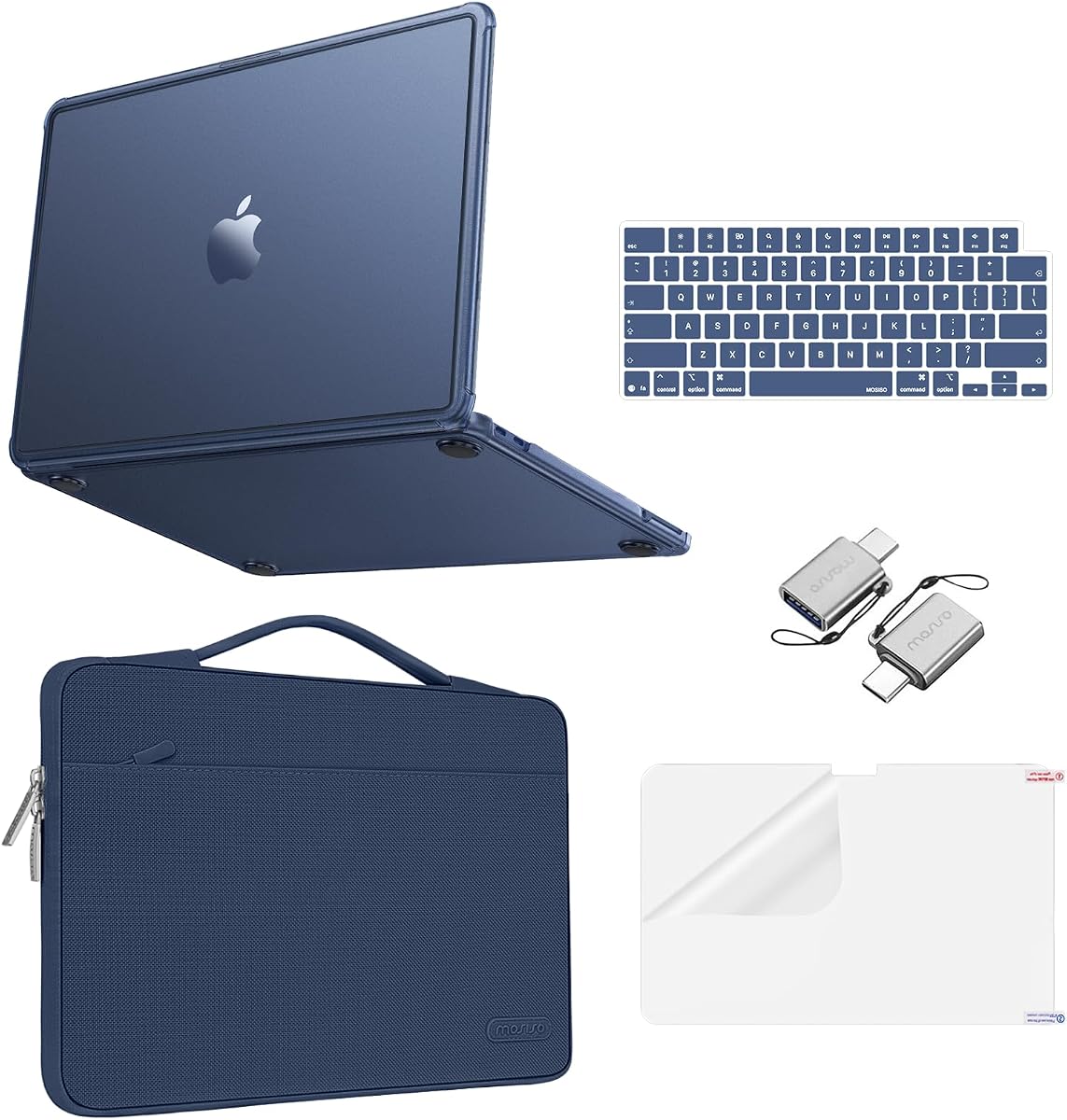
This MOSISO case bundle is a top choice for those wanting full coverage for their MacBook Neo. Rated 4.5 stars, it provides a hard shell case alongside keyboard covers and a screen protector for total defense.
We may earn a commission when you buy through this link, at no additional cost to you.
The polycarbonate shell wraps every side of the laptop to guard against keys and coffee spills. Its crystal clarity allows the original design to shine while offering resistance to cracks and scuffs.
Although it is designed specifically for the A3404 model, users should double-check their device number before buying. The precise fit ensures stability but limits compatibility with other MacBook versions.
Ideal for students carrying laptops in backpacks, this kit covers all bases without adding bulk. It is a smart investment for anyone seeking reliable and complete protection.
Protect every part of your laptop with included screens and keyboard covers.
Maintains the look of your Neo while shielding it from daily wear and tear.
We may earn a commission when you buy through this link, at no additional cost to you.
The MOSISO Premium Case stands out with its engineered matte finish that actively repels fingerprints. With a 4.6 rating, it combines a hard shell with a 360-degree sleeve for comprehensive security.
We may earn a commission when you buy through this link, at no additional cost to you.
Its surface stays cleaner longer than glossy options, keeping your laptop looking pristine throughout the day. The included bag cushions the device against bumps and scratches while maintaining a slim profile.
The bundle includes two keyboard covers and a screen protector for extra peace of mind. Some may prefer a clear shell but the durability here justifies the choice for heavy users.
This set is best for travelers and professionals who want polished protection without fingerprints. It offers a premium feel that matches the high standards of the MacBook Neo device.
Advanced matte coating minimizes smudges for a consistently professional appearance.
Includes a lightweight sleeve that fits easily into briefcases and backpacks.
We may earn a commission when you buy through this link, at no additional cost to you.
This MOSISO bundle offers a soft quilted puffy sleeve alongside a hard shell case. With a 4.6 rating, it balances style and function for daily use in offices or schools.
We may earn a commission when you buy through this link, at no additional cost to you.
The plush interior cushions your laptop against scratches and bumps while the shell guards against physical impacts. This dual layer approach provides reliable security without adding significant weight.
Users receive keyboard covers and a screen protector to complete the package. Some might prefer a traditional bag but the unique design here stands out for its aesthetic appeal.
It is an excellent option for users who want both a stylish carry option and direct device protection. The versatility makes it a strong contender for diverse lifestyles.
Combines a fashionable puffy sleeve with a sturdy hard shell for protection.
Easy to slide into bags while keeping your Neo safe from bumps.
We may earn a commission when you buy through this link, at no additional cost to you.
The EooCoo Case is rated 4.7 stars for its transparent design that showcases the MacBook Neo color. It offers a slim profile while maintaining durability against scratches and minor bumps.
We may earn a commission when you buy through this link, at no additional cost to you.
Its full edge wrap shields the sides of your device from scuffs and fingerprints effectively. The kit includes a matching keyboard cover and a USB-C adaptor for added utility.
While it looks great it might show dust more than matte options. This is a minor trade-off for those who prioritize keeping the look of their laptop visible.
This case is perfect for users who value aesthetics alongside protection. It ensures your device looks brand new while offering essential guards against daily wear.
Transparent materials allow the Neo color to remain fully visible and vibrant.
Adds minimal bulk while offering durable protection for everyday tasks.
We may earn a commission when you buy through this link, at no additional cost to you.
The VENTION USB-C Hub delivers blazing-fast bandwidth with support for 8K video output. Rated 4.2 stars, it features a detachable magnetic design that simplifies connection for MacBook Neo users.
We may earn a commission when you buy through this link, at no additional cost to you.
It supports 140W charging which ensures your laptop stays powered during heavy use. The aluminum alloy shell helps dissipate heat efficiently while maintaining a stylish look on your desk.
Some users need to ensure their MacBook does not have a bottom case as it may not fit. Additionally the high performance requires a Thunderbolt-enabled host for full features.
This hub is ideal for professionals who need to connect to high-resolution displays quickly. It transforms your laptop into a powerful workstation without permanent modifications.
Connect to 8K screens for immersive viewing and detailed work tasks.
Magnetic design allows for quick and easy attachment without plugging.
We may earn a commission when you buy through this link, at no additional cost to you.
This Magnetic Privacy Screen Protector offers robust data protection with a strong magnetic attachment. Rated 4.2 stars, it allows for one-second installation without leaving any adhesive residue on your screen.
We may earn a commission when you buy through this link, at no additional cost to you.
It blocks side views beyond 30 degrees so your data remains hidden from prying eyes. The anti-blue light coating helps relieve eye strain during long periods of work in offices.
Users must align the top edge correctly for the magnet to hold firmly. Some may find the setup tricky at first but the convenience of removal makes it worthwhile.
This screen is perfect for those working in shared spaces like cafes or airports. It ensures your content stays private while keeping the screen safe from scratches.
Blocks side views effectively to keep sensitive information confidential.
Blue light technology reduces strain for more comfortable long-term viewing.
We may earn a commission when you buy through this link, at no additional cost to you.
The Peslv Privacy Screen focuses on health by reducing 95% of blue light exposure. Rated 4.2 stars, it uses imported materials to ensure high definition transmission while protecting your eyes.
We may earn a commission when you buy through this link, at no additional cost to you.
Its magnetic design allows you to install and remove it in seconds easily. The filter corrects the viewing angle so that only those directly in front can see the screen.
Although it is higher priced the health benefits and clarity may justify the cost. Users should take time to align it perfectly for the best viewing experience.
Ideal for frequent travelers and those concerned about eye health this screen adds value. It balances privacy protection with significant improvements to visual comfort.
Advanced filter layer minimizes blue light to reduce strain and fatigue.
Comes with a clip so you can store it safely when not in use.
We may earn a commission when you buy through this link, at no additional cost to you.
Synerlogic offers a shortcuts sticker that works on many Mac models including the Neo. Rated 4.6 stars, it features laminated vinyl for durability and a design that helps beginners learn commands.
We may earn a commission when you buy through this link, at no additional cost to you.
Its strong adhesive holds well but you should peel gradually to avoid bubbles. The sticker keeps essential commands visible so you can boost productivity without searching.
While it is designed to fit multiple models sizes might vary slightly by device. Some users report residue but it wipes off easily with warm soapy water.
This is a great option for those who want a reliable guide on their device. It supports learning and efficiency for anyone using a Mac laptop daily.
Keep essential commands visible to boost skills without interrupting your workflow.
Manufactured in the USA with materials built to last and resist wear.
We may earn a commission when you buy through this link, at no additional cost to you.
CaseBuy offers a 7-pack of silicone plugs designed to seal your MacBook Neo ports. Rated 4.7 stars, this set includes covers for USB-C HDMI and SDXC to keep debris out.
We may earn a commission when you buy through this link, at no additional cost to you.
The soft silicone material is flexible and durable without damaging the ports during insertion. Its low-profile design ensures it does not interfere with the laptop's aesthetics or closure.
These small parts might get lost but the included plastic case helps keep them organized. It is a small detail that adds up to longer lifespan for your hardware.
This accessory is a smart purchase for those who want to prevent dust buildup. It protects your ports from scratches and liquid splashes effectively over time.
Seal your ports against debris to maintain optimal functionality over time.
Low profile design keeps your laptop looking clean and safe.
We may earn a commission when you buy through this link, at no additional cost to you.
Selecting the right accessories for your MacBook Neo requires evaluating compatibility and features. This guide breaks down key factors to help you make an informed choice.
Always check the model number A3404 before buying any case or screen. The Neo is unique and many items are designed specifically for this 13-inch release.
Confirming compatibility prevents returns and ensures a perfect fit for your device.
Decide whether you need a simple hard shell or a full kit with a sleeve. Hard shells protect against scratches while sleeves cushion against drops and bumps.
Choose the level of protection that matches your daily environment and travel habits.
Look for materials like polycarbonate and silicone that resist wear and tear. High-quality materials ensure the accessory stays durable over long periods of use.
Premium finishes also maintain the look of your laptop without yellowing or fading.
If you work in public spaces a magnetic privacy screen can block side views. These screens protect your data from unwanted eyes while keeping the display clear.
Evaluate how often you work outside before deciding on a privacy filter.
USB-C hubs add ports for HDMI or USB-A devices essential for work. Ensure the hub supports your laptop's bandwidth for fast data transfers and charging.
Selecting the right hub enhances your laptop's utility without compromising speed.
Consider whether you prefer a clear case to show off your laptop or a matte finish. Some users prioritize looks while others focus on practical protection features.
Choosing the right style ensures you are happy with the daily look of your device.
Accessories with magnetic designs or tool-free installs save time and frustration. A simple setup process makes it easier to maintain your protection daily.
Prioritize items that are straightforward to apply and remove when needed.
Balance the cost with the features included in the product bundle. Kits offering screen covers and bags often provide better value than single items.
Invest in quality accessories that offer long-term use without frequent replacement.
Clean your device surface before applying any sticker or screen protector to ensure adhesion. Use a soft cloth to remove dust so the accessory sticks evenly.
Inspect your case regularly for cracks or loose fits to maintain effective protection. Replace any worn-out items immediately to avoid damage to your MacBook Neo.
Store magnetic items like privacy screens in their provided bags or cases. This prevents scratches and ensures they stay ready for use when you need them.
Most items listed are specifically for the MacBook Neo model A3404. Some stickers might fit Air but cases are tailored for the Neo design.
Hard shell cases are designed to be slim and add minimal weight. Many users report they do not notice significant bulk when carrying the laptop.
Yes most magnetic privacy screens are ultra-thin and fit under lids easily. Just ensure the case does not block the magnetic strip on your screen.
Use mild soap and water to wipe down the shell gently. Avoid harsh chemicals that might damage the transparency or finish of the material.
Most hubs in this guide include HDMI USB-A and power delivery ports. Check specs for 4K video support if you need external display connections.
Silicone covers are usually flexible and can be pulled off easily. They often lift cleanly without leaving residue on the keys.
Use warm soapy water and a soft cloth to wipe off glue marks. Gentle rubbing usually clears any adhesive left behind when removing stickers.
Many brands offer satisfaction guarantees or limited warranty on defects. Check the seller's policies before purchasing to understand the protection offered.
Your selection of accessories defines the usability and safety of your new MacBook Neo. The top picks like the MOSISO bundle and VENTION hub offer reliable solutions for protection and work.
Focus on needs like privacy or connectivity when selecting items. A good case prevents damage while a hub expands your ability to work anywhere.
Always check availability and current deals before finalizing your purchase. This ensures you get the best value for your laptop setup in 2026.