
HP 255 G10 Business Laptop
4.8Editor score
AMD Ryzen 3 7330U processor
Windows 11 Pro with AI Copilot
Full HD IPS narrow bezel display
This guide compares the best laptops with 10 keypad for productivity, accounting, and data entry, featuring detailed specs and expert insights on selection.
Finding a reliable laptop with a dedicated numeric keypad is essential for professionals who handle data entry, accounting, or spreadsheet work daily. These devices streamline workflows by providing quick access to numbers without switching layouts. Choosing the right model ensures comfort and efficiency during long working hours.
We evaluated ten top models based on performance, display quality, keyboard design, and overall value. Each laptop was assessed for its suitability in business and home office environments. Our analysis focuses on real-world usability, battery life, and the presence of a full-size numeric keypad for accurate input.
Each pick in this list highlights key strengths and potential trade-offs to help you make an informed decision. Prices and availability fluctuate frequently, so verify current details before purchasing. We aim to provide clear, unbiased information to guide your next technology investment effectively.
4.8Editor score

4.5Editor score

4.1Editor score
This side-by-side comparison highlights the key specifications and features of all ten selected laptops to help you quickly identify the model that best fits your specific workflow needs and budget constraints.




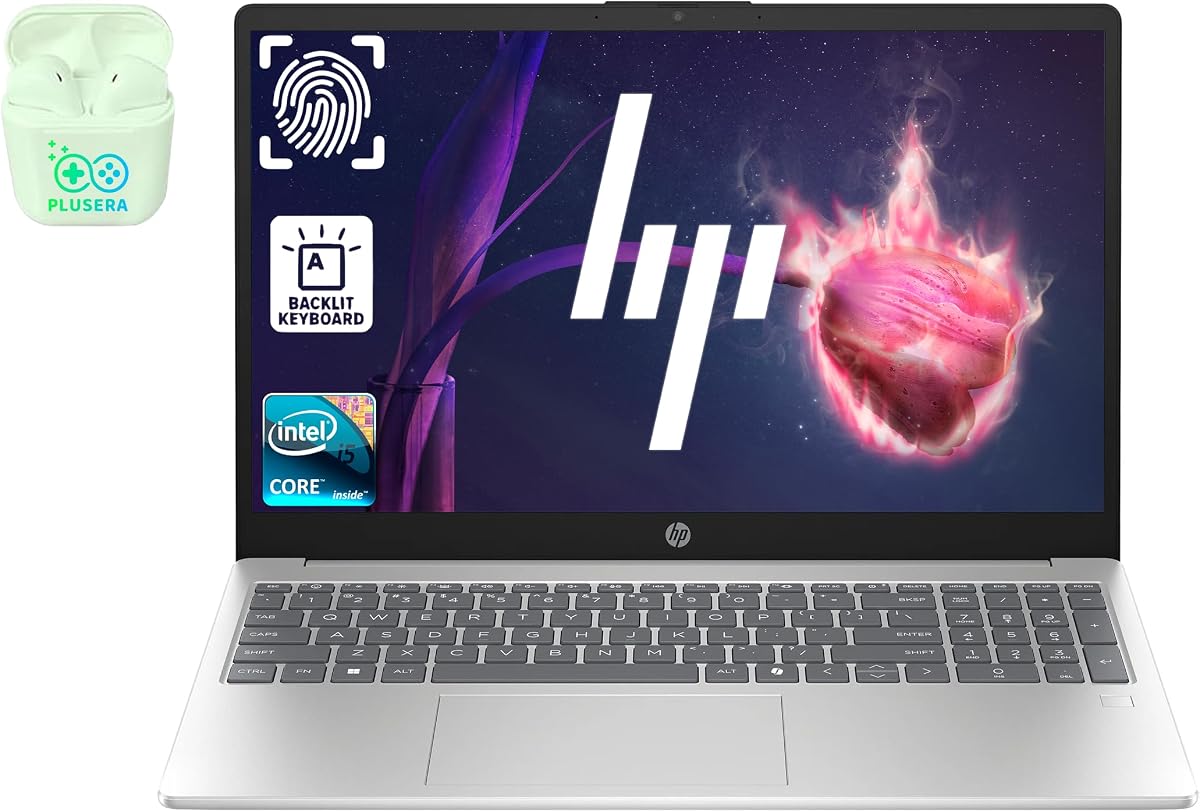

This HP 15.6 inch laptop offers a balanced combination of performance and practicality for everyday users. It features 16GB of RAM which ensures smooth operation when handling multiple applications at once. The dedicated numeric keypad is a significant advantage for anyone who works with spreadsheets or data entry regularly.
We may earn a commission when you buy through this link, at no additional cost to you.
The processor handles essential computing tasks like web browsing, email, and document editing with ease. With 600GB of storage including an external drive, you have plenty of room for files and media. The battery life is impressive, lasting up to 10 hours on a single charge which supports all-day mobility without constant access to an outlet.
While the processor is designed for essential tasks rather than heavy multimedia work, it meets the needs of most students and home users. The external drive integration is a unique feature that adds storage but may affect portability slightly. Overall the trade-offs are acceptable given the price point and the inclusion of a full-size keyboard with numeric keys.
This laptop is an ideal choice for students professionals and home office workers who need reliable performance without breaking the bank. The full-size keyboard with numeric keypad makes data entry comfortable and efficient. If you prioritize battery life and storage over raw processing power this model is a strong recommendation.
The dedicated numeric keypad allows for faster number entry which is essential for accounting and data management tasks. It reduces the need to switch between number rows and saves time during long work sessions.
With up to 10 hours of battery life you can work from the library coffee shop or while traveling without worrying about finding a power source immediately. This supports a flexible working schedule effectively.
We may earn a commission when you buy through this link, at no additional cost to you.
The HP 17.3 inch Business Laptop is designed specifically for professionals who require significant screen real estate for productivity. The large display allows for side-by-side multitasking which is perfect for comparing documents or working with complex spreadsheets. The 10-Core Intel Core 5 processor ensures that multiple applications run smoothly without lag.
We may earn a commission when you buy through this link, at no additional cost to you.
Equipped with 16GB of RAM and a 512GB SSD this laptop offers responsive performance and ample storage for business files. The numeric keypad is fully integrated into the full-size keyboard making data entry efficient and comfortable. Wi-Fi 6 support ensures fast and stable internet connectivity for video meetings and cloud access.
While the size may make it less convenient for travel compared to smaller models it is an excellent choice for a stationary home office or desk setup. The larger screen footprint requires more desk space but rewards you with improved visibility and reduced eye strain. The investment is justified for users who spend hours daily on spreadsheet work.
This laptop is recommended for accountants analysts and business professionals who prioritize screen space and processing power. The combination of a large display dedicated numeric keypad and robust hardware makes it a top contender for serious productivity tasks. If you need a desktop replacement that still offers some mobility this model is a strong choice.
The 17.3 inch screen provides significantly more viewing area than standard 15 inch laptops allowing you to keep multiple windows open without clutter. This is crucial for detailed work involving large datasets.
With a 10-Core processor and 16GB RAM this machine handles intensive multitasking including video meetings and heavy Excel files with ease. It is built for consistent daily professional use.
We may earn a commission when you buy through this link, at no additional cost to you.
The HP Pavilion 15.6 FHD laptop delivers essential performance for students and casual users at an accessible price. The Intel N100 processor is sufficient for web browsing video conferencing and document editing. The Fast HD display provides clear visuals which is important for long study sessions and media consumption.
We may earn a commission when you buy through this link, at no additional cost to you.
Storage is handled by a 256GB SSD which ensures fast boot times and responsive file access. The laptop weighs only 3.64 pounds making it easy to carry between classes or to the library. The numeric keypad is a practical addition for students who need to input data for assignments or projects.
While the 8GB of RAM is standard for this price range it may become a bottleneck if you open too many browser tabs simultaneously. The processor is not designed for intensive graphics or heavy editing but it serves well for general productivity. These limitations are expected at this price point and do not detract from its core utility.
This laptop is a great recommendation for students who need a reliable device for everyday coursework. The numeric keypad is a nice bonus for those in fields like accounting or business where number entry is frequent. If you want a balance of portability performance and cost this model fits well.
Weighing just 3.64 pounds this laptop is easy to slip into a backpack and carry throughout the day without strain. The sleek design adds to its appeal for student users.
The PCIe NVMe SSD ensures that the system starts up quickly and applications load in seconds saving you valuable time each morning before class or work.
We may earn a commission when you buy through this link, at no additional cost to you.
The HP 255 G10 Business laptop stands out for its powerful AMD Ryzen 7 processor which delivers strong performance for demanding business tasks. With 16GB of RAM it handles complex workflows smoothly whether you are managing databases running virtual meetings or analyzing financial reports. The 512GB SSD ensures that all your applications and files load quickly.
We may earn a commission when you buy through this link, at no additional cost to you.
Running on Windows 11 Pro this device offers enterprise-grade security features and management tools that are valuable for small businesses. The numeric keypad is integrated into a full-size keyboard which supports accurate data entry. Connectivity options include Wi-Fi 6 and multiple USB ports allowing you to connect various peripherals easily.
The display is standard FHD with anti-glare coating which is comfortable for indoor use. While the brightness is adequate for office environments it might not be ideal for very bright outdoor settings. The overall build quality feels solid and designed for reliability in a professional setting where consistent performance matters.
This laptop is best suited for professionals who need reliable processing power and security features. The Ryzen 7 processor is a significant upgrade over entry-level chips ensuring longevity in use. If you require a business-ready machine with a numeric keypad and strong multi-tasking capabilities this is a compelling option.
Windows 11 Pro provides enhanced security features like BitLocker and remote desktop which are essential for protecting sensitive business data and facilitating remote work efficiently.
The Ryzen 7 7730U with 8 cores and 16 threads handles multitasking and heavy applications with ease ensuring your workflow remains uninterrupted during critical work hours.
We may earn a commission when you buy through this link, at no additional cost to you.
The HP 15.6 Portable laptop is an excellent entry-level option for those who need a functional machine without a high price tag. It includes a one-year subscription to Microsoft 365 which adds significant value by providing access to essential office tools like Word and Excel. The numeric keypad is present making it suitable for light accounting or data tasks.
We may earn a commission when you buy through this link, at no additional cost to you.
Powered by an Intel N200 processor and 8GB of RAM this device handles basic web browsing document editing and media playback effectively. The 128GB SSD is compact but sufficient for storing essential documents and photos. Wi-Fi 6 support ensures you stay connected with faster speeds when available.
Storage space is limited at 128GB so you may need to use cloud storage or external drives for larger media libraries. The HD resolution display is adequate for reading text but lacks the sharpness of Full HD screens. These constraints are typical for budget devices and do not hinder core productivity tasks significantly.
This laptop is perfect for students on a tight budget or as a secondary home computer. The inclusion of Microsoft 365 is a major benefit that offsets the lower storage capacity. If you need a reliable numeric keypad laptop for general use and value software savings this model is a top budget pick.
The inclusion of a one-year Microsoft 365 subscription means you have access to powerful productivity tools immediately without needing to purchase them separately which saves money for users.
The N200 processor is optimized for efficiency and handles everyday tasks like email web browsing and document typing smoothly making it ideal for casual users.
We may earn a commission when you buy through this link, at no additional cost to you.
This HP 255 G10 Business laptop has earned a high user rating due to its reliable performance and feature set. It features an AMD Ryzen 3 processor that balances efficiency and speed for daily business tasks. The 16GB RAM ensures that you can run multiple applications without slowdowns making it suitable for multitasking professionals.
We may earn a commission when you buy through this link, at no additional cost to you.
The display is a Full HD IPS panel which offers wide viewing angles and good color reproduction. This is beneficial for presentations or working with documents for extended periods. The numeric keypad is part of the full-size keyboard enhancing productivity for those who frequently enter data. Connectivity includes Wi-Fi 6 and Bluetooth 5.3 for stable connections.
One consideration is that the RAM and SSD were upgraded after the original seal was opened which means warranty coverage is split between the manufacturer and PCOnline. This is a common practice for custom configurations but users should be aware of the warranty terms. Overall the machine provides excellent value for its performance capabilities.
This laptop is a strong choice for home office users who want a reliable machine with a numeric keypad. The high rating suggests that buyers are satisfied with the stability and speed. If you prioritize user feedback and balanced specs this model is worth serious consideration for professional work.
The IPS panel provides wide viewing angles and consistent color which is essential for collaborative work or viewing content from different positions without distortion.
Features like Wi-Fi 6 and Bluetooth 5.3 ensure modern connectivity standards are met allowing for seamless pairing with peripherals and fast internet access.
We may earn a commission when you buy through this link, at no additional cost to you.
The Lenovo V15 Gen 4 Business Laptop is tailored for users who require robust connectivity and performance. The inclusion of an RJ45 Ethernet port is rare in modern laptops and ensures stable wired internet connections for reliable meetings and data transfers. The Core i5 processor provides enough power to handle complex business applications smoothly.
We may earn a commission when you buy through this link, at no additional cost to you.
With 16GB of RAM and a 512GB SSD this laptop offers responsive performance and sufficient storage for professional files. The numeric keypad is integrated into the keyboard layout which helps with data entry tasks. The full HD display provides clear visuals for daily work and presentations.
The system runs Windows 11 Pro which adds valuable security and management features. However the presence of an Ethernet port might add slight bulk to the device compared to ultra-thin options. This is a trade-off for professionals who rely on wired networks for security or speed. The overall build is sturdy and business ready.
This laptop is recommended for IT professionals or office users who need reliable connectivity options. The combination of a strong processor and dedicated Ethernet port sets it apart from other models in its class. If you work in environments where wired connections are preferred this model will serve you well.
Having a dedicated Ethernet port allows for stable wired internet connections which are crucial for offices with strict network security or unstable wireless environments.
The Core i5-13420H provides solid performance for demanding applications ensuring that your workflow remains efficient during busy workdays without lag.
We may earn a commission when you buy through this link, at no additional cost to you.
The Dell Inspiron 15.6 Business Laptop brings a touchscreen interface to productivity work which adds versatility to navigation. The FHD screen offers vibrant visuals and the touch capability makes interacting with Windows easier. It is powered by a 10-Core Intel i5 processor that delivers strong performance for daily tasks and light media work.
We may earn a commission when you buy through this link, at no additional cost to you.
The numeric keypad is included on the keyboard making it suitable for data entry tasks. AI Copilot is pre-loaded to assist with task organization and information summarization. The 256GB SSD provides fast access to your files and applications ensuring a smooth user experience. Connectivity is robust with various USB ports and HDMI output.
While the 8GB of RAM is adequate for general use it may struggle with heavy multitasking. The touchscreen feature consumes more battery life than a non-touch panel so unplugged use time may be limited. These factors are typical for touch-enabled laptops and balance out with the added functionality they provide.
This laptop is a great fit for creative professionals or students who benefit from touch navigation. The combination of a numeric keypad and touchscreen offers a unique workflow advantage. If you value interactive display features alongside traditional keyboard input this model is a strong contender.
The FHD touchscreen allows you to navigate apps and documents with a tap or swipe providing a more intuitive user experience for visual workflows.
Built-in AI Copilot helps you organize tasks and summarize information quickly which streamlines workflows and improves overall productivity.
We may earn a commission when you buy through this link, at no additional cost to you.
This renewed HP 15.6 Business Laptop offers a high-value option for budget-conscious buyers who still want premium features. The backlit keyboard allows for comfortable typing in low-light conditions which is useful for evening work. The fingerprint reader adds an extra layer of security for protecting your data and quick login.
We may earn a commission when you buy through this link, at no additional cost to you.
The Intel Core i5-1334U processor provides strong performance for multitasking and business applications. With a 256GB SSD you have fast storage for essential files. The numeric keypad is fully functional making data entry straightforward. The inclusion of earphones is a nice bonus for calls and media consumption.
While it is a renewed product it comes with a high user rating which suggests reliability and good condition. Warranty coverage is split between the original manufacturer and the refurbisher so be sure to read the terms. The price point is attractive compared to new models with similar specifications.
This laptop is ideal for users who want modern features like a backlit keyboard and security at a lower cost. If you are open to refurbished devices that have been tested for quality this model offers significant savings without compromising on core functionality.
The backlit keyboard allows you to type comfortably in dim lighting conditions which is ideal for late-night work or travel situations without a desk lamp.
Integrated fingerprint reader provides quick and secure access to your system protecting sensitive data and saving time on password entry.
We may earn a commission when you buy through this link, at no additional cost to you.
The HP 17 Business Laptop is a modern 2026 edition designed for users who demand a large display for productivity. The 17.3 inch FHD anti-glare screen provides sharp details and vivid colors which enhance the viewing experience for work and entertainment. The AMD Ryzen 5 CPU ensures smooth performance for everyday computing tasks.
We may earn a commission when you buy through this link, at no additional cost to you.
With 16GB of RAM and a 512GB SSD this laptop handles multitasking and data storage effectively. The numeric keypad is fully integrated into the keyboard which supports efficient number entry. Long battery life and fast charging features ensure you stay productive throughout the day without needing constant recharging.
The larger size makes it less portable than 13 or 15 inch models but it serves well as a desk companion. Office 365 for Web is included for creating and editing documents online which adds value for remote workers. The overall design is sleek and durable with a vibrant silver finish.
This laptop is a strong choice for home office users who need a large screen for spreadsheets or media work. If you prioritize display size and processing power over portability this model is an excellent fit for your needs.
The 17.3 inch display offers ample space for multitasking allowing you to view multiple documents or applications side by side without resizing windows constantly.
Extended battery life supports non-stop work sessions whether you are traveling or working from a location without easy access to a power outlet.
We may earn a commission when you buy through this link, at no additional cost to you.
Selecting the right laptop with a numeric keypad involves evaluating hardware performance display quality and specific features tailored to your workflow needs.
The processor is the brain of your laptop and determines how quickly applications run and how well the system handles multiple tasks. For basic office work and data entry models with Intel Core i5 or AMD Ryzen 5 processors provide a good balance of speed and efficiency. If you work with complex spreadsheets or large datasets consider higher-end options like Ryzen 7 to ensure smooth performance during peak usage times.
Choose a processor that matches your daily workload to avoid lag and frustration during critical work hours.
Random Access Memory allows your computer to run multiple applications at once. Most budget models come with 8GB of RAM which is sufficient for web browsing and document editing. For heavy multitasking involving many browser tabs and specialized software 16GB is recommended to ensure smooth operation without slowdowns.
Opt for 16GB RAM if you plan to keep multiple programs open simultaneously for optimal productivity.
Solid State Drives offer faster boot times and file access than traditional hard drives. A minimum of 256GB is advisable for storing operating systems and essential files comfortably. If you work with large files such as videos or extensive databases consider models with 512GB or more to avoid running out of space quickly.
Select storage size based on your file needs to prevent constant cleanup and management hassles.
A larger screen can improve productivity by providing more space for spreadsheets and side-by-side windows. Full HD resolution ensures text is crisp and easy to read. Anti-glare coatings are helpful for indoor environments where reflections can cause eye strain. Choose a size that fits your desk space and mobility requirements.
Balance screen size with portability to ensure comfort during extended work sessions.
A full-size keyboard with a dedicated numeric keypad is essential for accurate and fast number entry. Ensure the keys have comfortable travel and spacing to prevent fatigue. Backlit keys are a valuable feature for working in low-light environments. Verify that the numeric layout is standard to avoid confusion during data entry.
Prioritize a high-quality keyboard layout to maintain efficiency and comfort during daily typing tasks.
If you work from various locations battery life is a critical factor. Look for laptops that offer at least 8 to 10 hours of usage on a single charge. Fast charging capabilities can also reduce downtime when you are away from a power source. Consider the weight of the device if you plan to carry it often.
Check battery specifications to ensure the laptop supports your typical workday without frequent recharging.
Modern laptops should offer a variety of ports to connect to monitors peripherals and external drives. USB-C USB-A and HDMI ports are common and useful. Wi-Fi 6 provides faster internet speeds which are helpful for video conferencing. If you work with legacy devices an Ethernet port might be necessary for stable network connections.
Verify the available ports match your peripheral needs to avoid needing external adapters for your accessories.
Windows 11 Pro offers advanced security features and management tools compared to Home versions. It is beneficial for business users who handle sensitive data. Ensure the system comes with updated antivirus protection and security patches. Features like fingerprint readers add an extra layer of protection for quick and secure access to your files.
Choose a system with robust security features to protect your professional data from unauthorized access.
To maximize productivity ensure that your numeric keypad is enabled if it is separate from the main keyboard. Most models have a dedicated key or combination to toggle the keypad on and off. Practice typing numbers using the dedicated keys to improve speed and accuracy over time.
Keep your keyboard clean by using a soft brush or compressed air to remove dust from between the keys. Avoid eating or drinking near the laptop to prevent spills that could damage the numeric keypad mechanism. Regularly wipe the surface with a microfiber cloth to maintain a clean working environment.
Update your operating system and drivers regularly to ensure optimal performance and security. Manage your battery by adjusting display brightness and closing unused applications when not in use. Store the laptop in a protective case when transporting to prevent physical damage to the numeric keypad area.
No many compact laptops especially 13-inch models do not include a dedicated numeric keypad to save space. Laptops with 15-inch or larger screens typically include them. Always check the product specifications or images to confirm the presence of a numeric keypad before purchasing a model.
Yes you can purchase a USB or wireless external numeric keypad separately to add this functionality. These peripherals plug into a USB port and connect to your laptop allowing you to input numbers efficiently. It is a cost-effective solution if you already have a laptop without a built-in keypad.
Windows 11 Pro includes advanced features like BitLocker encryption remote desktop and enhanced management tools which are valuable for businesses. Home lacks these enterprise features but provides all standard consumer tools. Pro is generally recommended for professional environments where data security is a priority.
Yes Solid State Drives offer significantly faster boot times and file access compared to traditional Hard Disk Drives. They are more durable and consume less power making them ideal for laptops. Most modern productivity laptops come with SSDs by default for improved overall performance.
For basic Excel tasks 8GB of RAM is usually sufficient. However if you work with large spreadsheets multiple open files or complex macros 16GB is recommended to prevent slowdowns. More RAM allows your system to handle data processing tasks more efficiently without lag.
Wi-Fi 6 provides faster data transfer speeds and better performance in crowded network environments compared to older standards. It supports more connected devices simultaneously and improves connection stability. This is especially useful for video conferencing and large file downloads which require consistent bandwidth.
We reviewed ten top laptops that include a numeric keypad to meet the needs of professionals and students. Each model offers a unique balance of performance display size and features to suit different budgets and workflows.
Prioritize processing power and storage if you handle heavy data tasks. For general use focus on battery life and display quality. Ensure the keyboard layout feels comfortable for your typing style.
Prices and availability change frequently so check the current listings for the most accurate information. We hope this guide helps you select the perfect laptop to enhance your daily productivity and efficiency.