
PecuMecu Bluetooth 1D&2D Barcode Scanner
4.3Editor score
Three connection modes included
Up to 130000 storage
Fast 350 scans per second
This guide compares the top barcode scanners for iPad featuring Bluetooth connectivity, long battery life, and reliable scanning performance for retail and
Finding the right barcode scanner for iPad can transform how you manage inventory track sales or organize documents. A good model offers reliable Bluetooth pairing, long battery life, and fast decoding of various barcode types including QR and 1D codes.
We evaluated ten top-rated scanners based on connectivity options, scanning speed, battery endurance, and compatibility with iOS devices. Each pick was chosen for its ability to work seamlessly with popular retail and inventory apps on your tablet.
Each pick shows key specifications like connection range, sensor type, and included accessories. Prices and stock levels change frequently so verify current details before purchasing to ensure you get the best value for your specific workflow needs.
4.3Editor score
4.9Editor score

4.5Editor score
The following table provides a side-by-side comparison of all ten selected barcode scanners highlighting their core specifications and unique features to help you decide which model fits your needs.


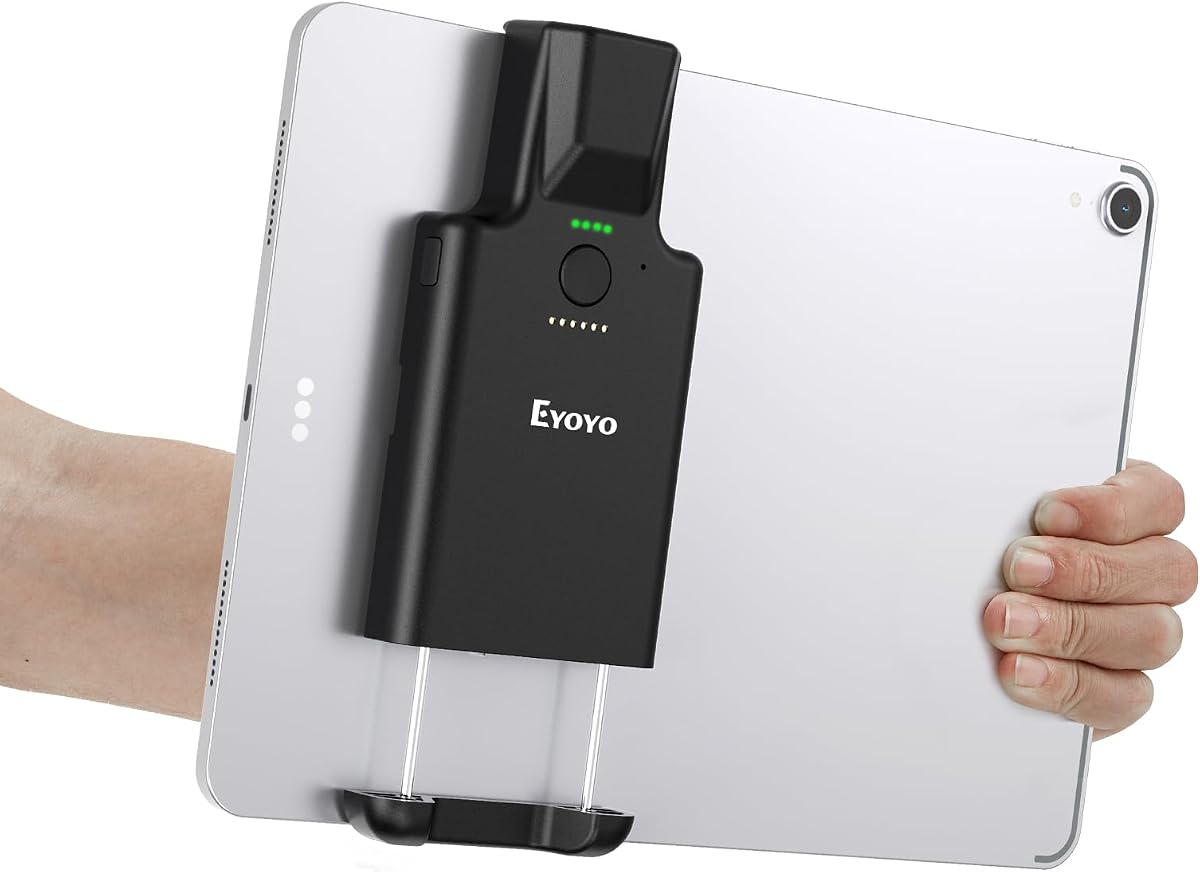
The Eyoyo 1D 2D Portable Bluetooth Barcode Scanner stands out as the top choice for iPad users with its unique clip design and exceptional battery life. Its 4.9 rating reflects high satisfaction from users needing reliable performance for retail or inventory tasks.
We may earn a commission when you buy through this link, at no additional cost to you.
The standout feature is the vertical retractable clip that fits tablets between 5.7 and 7.1 inches ensuring your iPad stays steady while you scan. The advanced 2D CMOS technology reads damaged or curved barcodes accurately and supports screen scanning for digital codes.
While it offers Bluetooth and USB wired modes it lacks the 2.4G wireless option found in other models which might limit range in larger warehouses. The weight is higher due to the clip mechanism but this provides the stability needed for professional use.
If you need a scanner that integrates directly with your iPad without a separate dock this model is ideal. Its thirty-hour battery ensures full shifts without charging making it perfect for busy retail or library environments where downtime is costly.
The retractable clip ensures your iPad stays stable during scanning reducing hand fatigue and improving accuracy in busy environments.
With up to thirty hours of continuous scanning the battery supports extended work shifts without needing frequent recharges.
We may earn a commission when you buy through this link, at no additional cost to you.
The PecuMecu Bluetooth Scanner offers an affordable entry into professional scanning with support for both 1D and 2D codes. Its 4.3 rating indicates strong value for users needing versatile connectivity without breaking the bank.
We may earn a commission when you buy through this link, at no additional cost to you.
This model supports 2.4G wireless Bluetooth and USB wired modes giving you flexibility in how you connect to your iPad or computer. The 2600mAh battery supports nine hours of scanning and storage mode saves up to 130000 barcodes offline.
Build quality is simpler compared to premium models and the battery life is shorter than some competitors. However the fast scanning speed and high storage make it a solid choice for small businesses or individual users on a budget.
If you need a scanner that works across multiple connection types at a low cost this is a great option. It handles QR codes and standard barcodes efficiently making it suitable for inventory tracking and basic retail tasks.
Supports 2.4G wireless Bluetooth and USB wired modes allowing flexible connection options for various devices and scenarios.
Internal offline storage saves up to 130000 barcodes enabling data capture even without a stable connection.
We may earn a commission when you buy through this link, at no additional cost to you.
The Inateck BCST-70 is a premium 1D scanner designed for durability and long-range performance. Its 4.5 rating reflects reliability for users needing a rugged tool that can withstand harsh environments.
We may earn a commission when you buy through this link, at no additional cost to you.
With a connection range exceeding 115 feet and up to 180 days of standby time this scanner minimizes downtime. The TPU protective case adds strength against drops and the multi-language support makes it versatile for international teams.
It only supports 1D barcodes so it is not suitable for QR or 2D codes. The price is higher than basic models but the build quality and battery longevity justify the investment for heavy-duty industrial or warehouse applications.
If your workflow relies on 1D barcodes and you need a scanner that can handle rough handling this is the best choice. Its simple setup and long standby time ensure it is ready when you need it.
Connection range reaches above 115 feet allowing you to scan items from a distance without losing connectivity.
Built with a TPU protective case and triple consolidation treatment to withstand repeated drops to concrete floors.
We may earn a commission when you buy through this link, at no additional cost to you.
The NETUM Bluetooth Barcode Scanner is a robust tool for users needing high scan capacity and multiple connection modes. Its 4.4 rating shows it performs well for general inventory and retail tasks.
We may earn a commission when you buy through this link, at no additional cost to you.
It supports 2.4G wireless Bluetooth and wired connections plus offers an auto-sensing mode for hands-free use. The 2600mAh battery lasts for 200000 scans and storage mode saves up to 100000 barcodes when out of range.
You must scan setting barcodes in the manual to configure modes which adds a setup step. It only handles 1D and stacked barcodes so it cannot read QR codes. However the scan speed and capacity are impressive for the price.
For users who need a reliable 1D scanner with strong storage and auto-sensing this model is a solid choice. It works well for bookstores or warehouses where tracking 1D codes is the primary need.
Auto-sensing scanning mode detects barcodes automatically without needing to press a trigger.
Stores up to 100000 barcodes in memory for later upload when connectivity is unavailable.
We may earn a commission when you buy through this link, at no additional cost to you.
The Eyoyo Mini is an ultra-light portable scanner weighing just 35 grams making it easy to carry all day. Its 4.3 rating reflects satisfaction among users needing a compact tool for quick checks.
We may earn a commission when you buy through this link, at no additional cost to you.
It offers 2.4G wireless Bluetooth and USB modes with a 50 meter Bluetooth range. The vibration mode is ideal for libraries or offices where beep sounds are disruptive. Battery life lasts up to 10 days with auto-off.
The battery capacity is lower at 650mAh so it may need more frequent charging during heavy use. It only supports 1D barcodes but excels in portability and comfort for users who prioritize lightweight gear.
If you need a scanner that fits in your pocket and does not disturb your surroundings this is the best option. It is perfect for bookstores or small retail shops where quiet operation is essential.
Vibration mode replaces the beep sound for quiet scanning in libraries or offices.
Ultra-light 35g design makes it easy to carry in a pocket for mobile tasks.
We may earn a commission when you buy through this link, at no additional cost to you.
The NetumScan Desktop Scanner is designed for fixed checkout counters or desks where handsfree operation is valuable. Its 4.6 rating shows it handles high-volume scanning well with minimal effort.
We may earn a commission when you buy through this link, at no additional cost to you.
It uses an omnidirectional window and automatic smart sensing to scan items placed on the desk. The anti-slip base keeps it stable and IP54 protection shields it from dust. It works via USB with no software needed.
Being USB wired limits mobility so it is not suitable for walking inventory checks. The handsfree nature is great for cashier workflows but restricts use to a specific spot. Setup is simple and fast.
If you need a scanner for a fixed checkout or reception desk this model is efficient and reliable. It reduces fatigue and speeds up transaction times with its automatic sensing feature.
Automatically activates when items move to the window allowing faster scanning without triggers.
IP54 technology protects the internal components from dust in busy environments.
We may earn a commission when you buy through this link, at no additional cost to you.
The NetumScan U820 comes with an integrated base that serves as both a charging dock and data receiver. Its 4.1 rating indicates decent performance for users prioritizing convenience and portability.
We may earn a commission when you buy through this link, at no additional cost to you.
The dock simplifies charging and connection eliminating cable clutter. The scanner is pocket-sized with a 1200mAh battery supporting extended shifts. It supports Bluetooth and 2.4G wireless and offers vibration for quiet environments.
The battery capacity is moderate compared to other models and the rating is slightly lower. However the dock design is useful for setups where keeping the scanner charged and paired is a priority.
If you want a scanner that pairs with a dock for easy charging and setup this is a good fit. It is optimized for iOS devices making it a strong option for iPad users in retail or libraries.
The base serves as a charging station and data receiver reducing cable clutter.
Pocket-sized ergonomic design ensures comfortable grip during all-day use.
We may earn a commission when you buy through this link, at no additional cost to you.
The NetumScan with Doc offers rugged durability with 2-meter drop protection and a global shutter CMOS sensor for fast 2D reads. Its 4.9 rating reflects high satisfaction among users in demanding environments.
We may earn a commission when you buy through this link, at no additional cost to you.
It includes a smart charging dock that acts as a data receiver and eliminates cable clutter. The dual-button control prevents accidental power-offs. Battery life lasts long enough for shifts and vibration mode reduces noise.
The design focuses on durability with vibrant accents and a solid grip. While the battery is moderate the protection features and sensor quality make it ideal for warehouses or field operations where scanners get dropped.
If you work in a busy warehouse or need a scanner that can survive falls this is a top choice. Its global shutter sensor reads codes quickly and accurately even on distorted or smudged items.
Built tough to withstand 2-meter drops onto concrete surfaces for rough environments.
Global shutter CMOS sensor instantly reads 1D and 2D codes accurately.
We may earn a commission when you buy through this link, at no additional cost to you.
This Wireless Handheld Barcode Scanner features 16MB memory for 50000 offline storage making it useful for data capture without connectivity. Its 3.8 rating suggests average performance but solid offline capabilities.
We may earn a commission when you buy through this link, at no additional cost to you.
It supports 2.4G wireless and Bluetooth with a password bypass direct connection. The ergonomic design weighs 110g for comfortable use. It scans 1D and 2D codes including QR and PDF417.
The rating is lower and you must push a side switch to turn it on which may be confusing. The storage capacity is a strong point for warehouses or events where internet is unstable.
If you need offline storage to batch upload data later this scanner offers practical value. It works well for field inventory where connectivity is intermittent and you need a lightweight device.
Built-in 16MB high-capacity memory supports 50000 offline storage.
2.4G wireless and Bluetooth scanning options provide flexible connection.
We may earn a commission when you buy through this link, at no additional cost to you.
The KUIIYER Bluetooth Barcode Scanner offers an 800×600 pixel CMOS sensor and IP54 rating for dust and water resistance. Its 4.3 rating shows it delivers strong performance at a competitive price.
We may earn a commission when you buy through this link, at no additional cost to you.
It includes a built-in auxiliary light for low-light scanning and supports multi-language settings. The 2000mAh battery ensures continuous usage and offline storage holds over 50000 barcodes. Works with Windows Mac iOS and Android.
The rating is slightly lower than top picks but the feature set is impressive for the cost. The IP54 rating makes it more durable than many basic models. It supports both 1D and 2D codes well.
If you need a scanner that works in varied lighting and environments with good durability this is a smart buy. The auxiliary light helps in dark warehouses or stores with poor lighting.
Built-in auxiliary light assists scanning in different lighting environments.
IP54 dust and waterproof rating protects against debris and moisture.
We may earn a commission when you buy through this link, at no additional cost to you.
Choosing the right scanner involves considering connectivity battery life and compatibility with your specific workflow needs.
Bluetooth and 2.4G wireless allow freedom of movement while USB wired offers stable connections. Look for scanners that support Bluetooth 4.0 or higher for better pairing with iPad devices.
Prioritize scanners with Bluetooth and wireless modes to ensure seamless iPad integration without cables.
Long battery life reduces downtime and supports full shifts. Check the mAh capacity and claimed scan hours before purchasing a model.
Opt for models with at least 8 hours of continuous scanning for daily workflows.
Ensure the scanner supports 1D or 2D codes like QR or Data Matrix. Some models only read printed 1D codes and not digital screen codes.
Select scanners with 2D CMOS sensors if you need to scan digital barcodes or QR codes.
Drop protection and IP ratings ensure the device survives rough environments. TPU cases and reinforced designs add longevity.
Choose rugged models with drop protection if your work involves field or warehouse use.
Verify that the scanner works with iOS and your inventory apps. Some models exclude certain POS systems or require extra drivers.
Confirm iOS compatibility and app support before finalizing your choice to avoid software issues.
Offline storage saves scans when no connection is available and uploads later. Look for capacities like 50000 or more barcodes.
Prioritize offline storage if you scan in areas without reliable internet or Bluetooth.
Lightweight designs and comfortable grips reduce fatigue. Pocket-sized options are easier to carry than bulky guns.
Choose ergonomic lightweight models for all-day mobile work to reduce hand strain.
Prices vary from budget to premium models. Check warranty terms and customer support availability for long-term reliability.
Compare warranty terms and support options alongside price to ensure value.
Pair the scanner with your iPad using Bluetooth settings or the 2.4G dongle. Follow the manual to scan configuration barcodes for mode setup.
Clean the sensor with a soft dry cloth to prevent debris from affecting scan accuracy. Store the device in a dry cool place to extend battery life.
Recharge the battery before it fully drains to maintain health. Use the docking station if available to keep the scanner organized and charged.
Most scanners work as keyboard HID devices so no extra apps are required. Simply open your text field and scan to input data.
Only scanners with 2D CMOS sensors can read digital codes on screens. Laser or CCD 1D scanners cannot read screens.
Many models support multiple modes automatically or via setting barcodes. Follow the manual to enable 2.4G or Bluetooth.
Battery life ranges from 8 hours to several weeks depending on usage. Models with 2600mAh or more offer longer shifts.
Yes many models have IP ratings and drop protection. Check for IP54 and 2-meter drop ratings for industrial use.
Most models offer offline storage for up to 50000 barcodes. Upload data once you regain connection.
The Eyoyo Portable Bluetooth Scanner offers the best blend of iPad integration and battery life. For budget needs the PecuMecu model provides great value with multiple connection options.
Prioritize 2D support and offline storage if you need to scan digital codes or work without internet. Durability features matter if your scanner sees heavy field use.
Always check current prices and stock levels as they fluctuate. Verify the latest specs and compatibility notes before purchasing to ensure your needs are met.