
Adesso AKB-132HB Multimedia USB Keyboard
4.2Editor score
Three built-in USB ports
Multimedia hotkey controls
Quiet membrane key switches
Find the best keyboard with USB port for your setup. We compare ten top models with built-in hubs for mice, drives, and more to boost productivity.
Finding a keyboard with USB port can streamline your workspace by reducing cable clutter and adding convenience. These devices integrate hubs directly into the chassis, allowing you to connect peripherals like mice or flash drives without reaching behind your computer. They are ideal for home offices and desktop setups where accessibility matters.
We evaluated ten real products based on port count, compatibility, build quality, and user ratings. Our analysis focuses on wired models that offer reliable connectivity and practical features like backlighting or multimedia controls. Each entry represents a verified option available to consumers seeking enhanced functionality from their typing input device.
Each pick highlights specific strengths such as hub speed, switch type, or ergonomic design. You will see detailed breakdowns to help you match a model to your operating system and workflow needs. Please note that availability and pricing may change over time, so verify details before purchasing to ensure you get the right fit.
4.2Editor score
4.4Editor score
4.3Editor score
This side-by-side comparison reviews all ten selected models to highlight their core specifications and unique selling points. You can quickly see which options offer more ports, better switch types, or specific compatibility for Mac and Windows systems. Use this table to narrow down choices before diving into the detailed reviews.






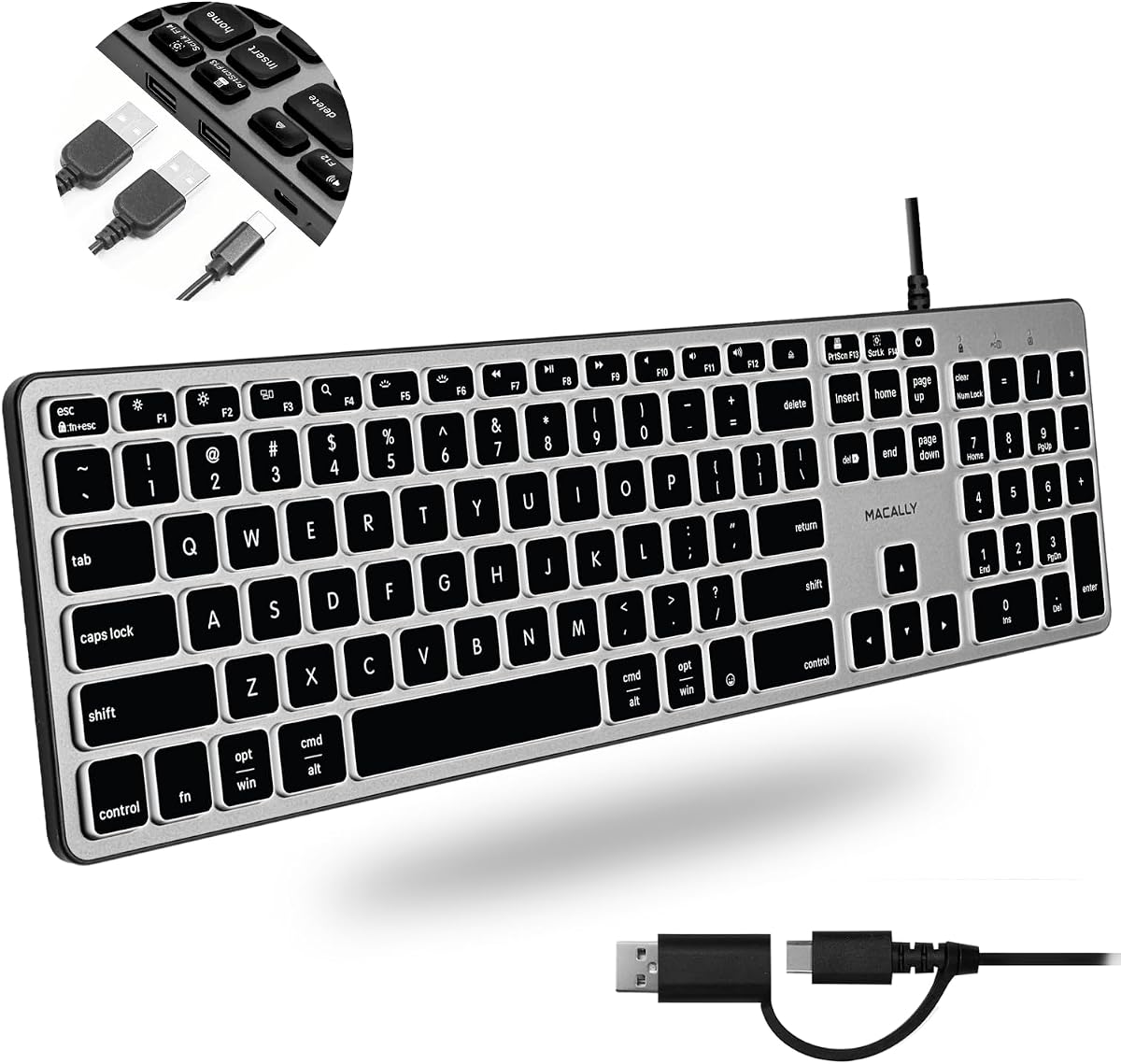
The Macally Wired Keyboard for Mac with USB Hub stands out as a top choice for users needing flexibility. With a rating of 4.4, it delivers reliable performance for both Mac and PC environments. Its standout quality lies in the hybrid USB port configuration that serves modern and legacy devices.
We may earn a commission when you buy through this link, at no additional cost to you.
Key strengths include the three-port USB hub offering two USB-A and one USB-C connections. This setup allows you to plug in a mouse and a drive simultaneously. The auto OS detection ensures all 107 keys adapt instantly without manual switching. White LED backlighting adds visibility in low light conditions.
Trade-offs involve the wired nature which limits placement freedom compared to wireless models. The price point is higher than basic membrane options but justified by the build quality. The 2-year warranty adds peace of mind for daily professional use.
This keyboard is ideal for Mac users who also connect Android or iPad devices. Professionals needing quick peripheral swaps will appreciate the hub integration. We recommend it for those seeking a seamless typing experience across multiple operating systems.
The mix of USB-A and USB-C ports ensures you can connect newer peripherals without adapters.
Auto detection adjusts key mappings instantly so you do not need to reconfigure settings manually.
We may earn a commission when you buy through this link, at no additional cost to you.
The Adesso AKB-132HB is a strong budget option with a 4.2 rating. It offers three built-in USB hubs for easy device access. The multimedia hotkeys let you control media players directly from the keyboard without using the mouse.
We may earn a commission when you buy through this link, at no additional cost to you.
Its strengths include quiet membrane key switches rated for five million keystrokes. The one-touch Windows controls open apps like calculator or mail instantly. This design prioritizes convenience for home office users on a budget.
It lacks backlighting which may limit use in dark rooms. The layout is optimized for Windows so Mac users might miss some functions. These trade-offs are acceptable given the low cost and functional hub design.
Buy this if you need a simple plug-and-play keyboard for daily tasks. It suits users who value extra USB ports over advanced features. We recommend it for students or entry-level office setups.
Three hubs allow you to connect multiple devices like flash drives and mice easily.
Built-in hotkeys let you pause or play music without leaving your typing position.
We may earn a commission when you buy through this link, at no additional cost to you.
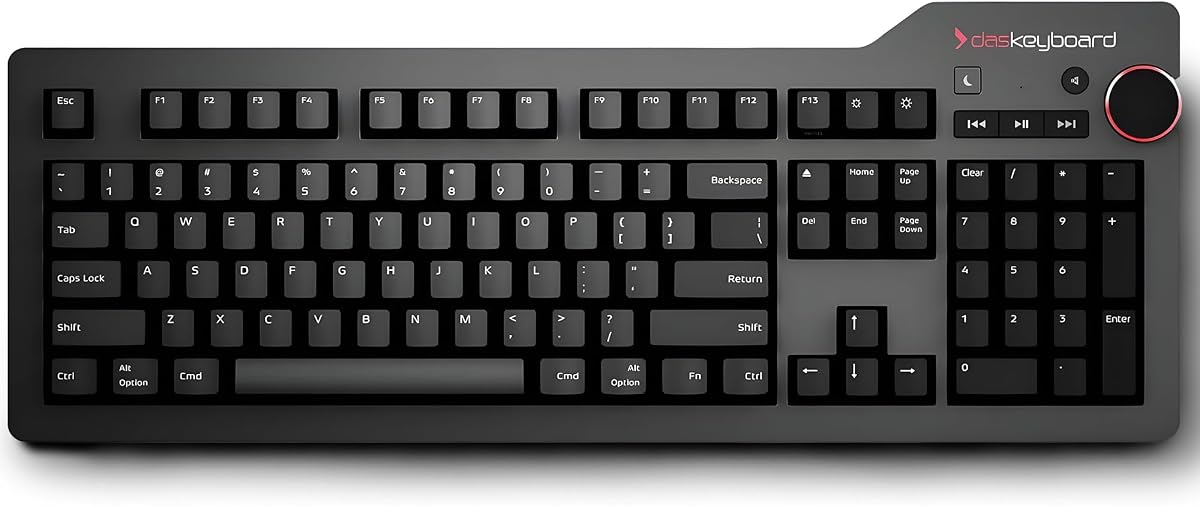
The Das Keyboard 4 Professional for Mac offers a premium typing experience with a 4.3 rating. It features Cherry MX Blue mechanical switches for tactile and audio feedback. The aluminum top panel adds durability and a sleek aesthetic to your desk.
We may earn a commission when you buy through this link, at no additional cost to you.
Key strengths include the 2-port USB 3.0 hub which transfers data at speeds up to 5Gb per second. A dedicated volume knob allows quick audio adjustments. Full N-Key Rollover ensures every keystroke registers accurately during rapid typing.
The audible click may disturb quiet environments. The weight makes it less portable. These factors are acceptable trade-offs for users seeking high-quality mechanical input and fast data transfer capabilities.
This model suits professionals who type for long hours. Gamers and designers will appreciate the precision and build quality. We recommend it for those prioritizing performance over budget constraints.
USB 3.0 hub allows fast file transfers while you work without slowing down your system.
Cherry MX Blue switches provide clear feedback so you can type with accuracy and speed.
We may earn a commission when you buy through this link, at no additional cost to you.
The Macally Premium Wired USB C Keyboard uses a modern USB-C cable for connection. It has a 4.2 rating and a space gray finish. This design fits seamlessly with newer Mac and PC devices that prioritize USB-C standards.
We may earn a commission when you buy through this link, at no additional cost to you.
Strengths include three extra ports for connecting mice or webcams. The scissor switches offer a quiet typing experience suitable for shared offices. Compatibility with Mac, PC, and Chrome ensures wide usability across different platforms.
If your computer lacks a USB-C port you will need an adapter. This limits direct compatibility with older machines. The trade-off is worth it for those upgrading to modern hardware setups.
This keyboard is perfect for MacBook Pro or Air users. It suits those who want a clean look and reliable typing. We recommend it for modern workstations needing future-proof connectivity.
USB-C cable ensures compatibility with the latest devices for a secure plug and play setup.
Scissor switches reduce noise so you can type without distracting others around you.
We may earn a commission when you buy through this link, at no additional cost to you.
The Logitech K120 is a basic option with an impressive 4.6 rating. It features a full-size layout with deep profile keys for comfort. While it lacks built-in USB hubs, its durability and comfort make it a strong contender for daily typing.
We may earn a commission when you buy through this link, at no additional cost to you.
Key strengths include spill resistance and anti-fade keys that ensure long life. The design creates a comfortable experience with tilt legs for adjustable height. It requires no software installation so you can use it immediately.
It lacks the USB hub functionality found in other models. Mac users will find it less compatible than Windows users. These trade-offs are acceptable if you need a sturdy keyboard without extra ports.
Buy this for reliable home or office use where cost and durability matter. It suits users who do not need integrated hubs. We recommend it for standard computing tasks on Windows systems.
Deep profile keys and adjustable legs reduce hand fatigue during long typing sessions.
The spill-proof design protects internal components from accidental liquid spills.
We may earn a commission when you buy through this link, at no additional cost to you.
The Perixx PERIBOARD-409H is a compact model with a 4.4 rating. It saves desk space by removing the number pad area. Two built-in USB hubs on the side offer flexibility for connecting extra input devices.
We may earn a commission when you buy through this link, at no additional cost to you.
Strengths include high-quality ABS key caps printed with durable UV coating. The membrane keys offer ten million switch life cycles. A 5.9 foot cable provides enough length for desk placement.
The lack of a number pad may hinder data entry tasks. Some users might find the cable too short for under-desk mounting. These trade-offs are acceptable for users needing a minimal footprint.
This keyboard suits tight workspaces or secondary monitors. It is ideal for users who rely on on-screen calculators. We recommend it for those prioritizing desk space over numeric input.
The mini layout removes the number pad to save space on smaller desks.
Hubs located on the side allow easy plugging without reaching behind the keyboard.
We may earn a commission when you buy through this link, at no additional cost to you.
The KOPJIPPOM Large Print Backlit Keyboard targets accessibility needs with a 4.5 rating. It features fonts four times larger than standard keys. White LED backlighting ensures visibility in low light environments for all users.
We may earn a commission when you buy through this link, at no additional cost to you.
Strengths include a spill-resistant design and ergonomic adjustable feet. The full-size layout provides a familiar typing feel without relearning. Compatibility with Windows covers most desktop and laptop setups.
It lacks built-in USB hubs which limits peripheral expansion. Mac users may face issues with multimedia keys. These trade-offs are acceptable for those requiring clear visual aids.
This keyboard is perfect for visually impaired users or schools. It suits libraries and special needs departments. We recommend it for environments where clear visibility is a priority.
Large fonts and LED backlighting help users see keys clearly in any lighting condition.
Full QWERTY layout ensures you do not need to relearn how to type for comfort.
We may earn a commission when you buy through this link, at no additional cost to you.
The Dell Wired Keyboard KB216 offers a standard office solution with a 4.6 rating. It features chiclet style keys that provide a modern look. Multimedia features add convenience without extra costs.
We may earn a commission when you buy through this link, at no additional cost to you.
Strengths include a lightweight design suitable for daily work tasks. It is designed to work well with various Dell systems but also functions generally. The black finish fits most professional settings.
It does not include USB hubs for extra connectivity. Users needing ports must rely on other solutions. These trade-offs are acceptable for those wanting a simple reliable typing device.
This keyboard is ideal for home or office use. It suits users who prioritize comfort and basic multimedia control. We recommend it for general computing tasks on a budget.
Chiclet keys provide a modern look that matches contemporary workstation aesthetics.
Built-in multimedia features let you manage media players with ease.
We may earn a commission when you buy through this link, at no additional cost to you.
The Das Keyboard 4 Professional is a mechanical powerhouse with a 4.3 rating. It uses Cherry MX Blue switches for precise keystrokes. A 2-port USB 3.0 hub supports fast content uploads directly from your desk.
We may earn a commission when you buy through this link, at no additional cost to you.
Strengths include gold-plated switches for rust resistance and durability. Full N-Key Rollover ensures accuracy for fast typists. The aluminum top adds a professional look to the setup.
The switches can be noisy which may bother coworkers. The keyboard is heavy and less portable. These trade-offs are acceptable for those needing high performance typing speed.
This model suits productive professionals and gamers. It is ideal for tasks requiring precise rapid input. We recommend it for desktop setups where performance is key.
USB 3.0 hub supports rapid file transfers at speeds up to 5Gb per second.
Gold-plated switches resist rust ensuring reliable contact over millions of keystrokes.
We may earn a commission when you buy through this link, at no additional cost to you.
The Genuine Dell Multimedia USB Keyboard serves business needs with a 4.6 rating. It includes 14 hot keys for quick access to functions like email or calculator. Two USB hubs provide convenient connectivity for peripherals.
We may earn a commission when you buy through this link, at no additional cost to you.
Strengths include a removable palm rest for added comfort. The spill-resistant design ensures longevity in busy office environments. It fits various Dell business laptop and tower models effectively.
Its part numbers indicate legacy compatibility which may limit new systems. The design is older compared to modern slim options. These trade-offs are acceptable for users needing business-specific hot keys.
This keyboard is perfect for Dell business workstation owners. It suits those needing quick access to common tools. We recommend it for office setups requiring robust functionality.
Fourteen dedicated keys provide one-touch access to common applications and settings.
Removable palm rest allows customization for extended typing comfort and support.
We may earn a commission when you buy through this link, at no additional cost to you.
Selecting the right keyboard with USB port requires understanding your specific needs for connectivity and typing comfort. This guide outlines key factors to consider when choosing a model that fits your workflow.
Check how many USB ports are available and whether they include USB-C. A mix of USB-A and USB-C ensures you can connect both older and newer devices without extra adapters. Look for models with at least two ports for flexibility.
Choose a configuration that matches your peripherals like mice, drives, or cameras.
Ensure the keyboard supports your OS like Windows or Mac. Auto OS detection simplifies switching between systems by adjusting key layouts automatically. Some models are optimized for Mac with specific shortcut keys.
Verify compatibility with your computer before purchasing to avoid functionality issues.
Decide between membrane and mechanical switches. Mechanical switches like Cherry MX offer tactile feedback and durability but may be noisy. Membrane switches are quieter and softer for general typing.
Select a switch type that matches your noise tolerance and typing style preferences.
Look for durable materials like aluminum top panels or spill-resistant designs. A sturdy build ensures the keyboard withstands daily use over years. Weight can also indicate stability during typing.
Prioritize materials that fit your desk environment and usage intensity.
Consider if you need LED backlighting for low-light use. Adjustable brightness levels help reduce eye strain in dark rooms. Not all models include this feature so check the specs carefully.
Choose backlighting if you work late or in dimly lit spaces.
USB 3.0 hubs transfer data faster than USB 2.0 versions. This matters if you connect external drives for frequent file transfers. Check the hub version to ensure it matches your speed needs.
Opt for USB 3.0 if high-speed data access is a priority for you.
Ergonomic features like adjustable tilt legs or palm rests improve comfort. These reduce hand fatigue during long typing sessions. Compact models may save space but require ergonomic assessment.
Prioritize comfort features if you type for many hours daily.
Multimedia hotkeys allow quick access to media playback or volume. These controls streamline entertainment without needing extra mouse clicks. Some models include dedicated volume knobs for precision.
Select models with controls that match your daily media usage patterns.
Connect the keyboard to your computer using the USB cable. Plug any devices like mice or drives into the built-in USB ports to utilize the hub feature. Ensure your system recognizes the keyboard by checking the OS settings.
Adjust the tilt legs to a comfortable angle that reduces wrist strain. Clean the keys regularly with a soft cloth to remove dust and debris. Avoid spilling liquids on the keyboard to prevent damage to internal components.
For mechanical models, press the keys firmly to register input but avoid excessive force. Update drivers if your operating system requires them for specific hotkeys. Store the keyboard in a dry place when not in use to maintain its condition.
Many models support both operating systems with auto OS detection. Mac-specific models often include shortcut keys tailored for Apple devices. Always verify compatibility in the product details before buying.
USB 3.0 hubs on keyboards offer speeds comparable to direct ports. USB 2.0 hubs are slower but sufficient for mice and drives. Check the hub version to ensure it meets your speed needs.
Yes, you can connect a wireless mouse to the keyboard's USB port using a receiver. This reduces the number of cables plugged directly into your computer. Ensure the port supports the wireless dongle size.
Look for keyboards with USB-C connectivity or hubs that include a USB-C port. Some models offer 2-in-1 plugs to adapt to different systems. This ensures compatibility with modern devices without adapters.
Mechanical keyboards often have audible click sounds especially with blue switches. Membrane options are quieter for shared spaces. Choose mechanical if you prefer feedback over silence.
Unplug the keyboard and tilt it upside down to let liquid drain. Wipe the surface with a dry cloth to remove residue. Most spill resistant models are designed to handle small accidental spills.
Most keyboards with USB hubs are plug and play requiring no software. Some models might need drivers for specific multimedia keys. Check the product details for any software requirements.
Warranties range from one to two years depending on the manufacturer. Some brands offer lifetime support for additional peace of mind. Review the warranty terms before purchasing to ensure coverage.
We reviewed ten keyboards with USB ports offering various features from budget-friendly to premium mechanical models. The Macally Wired Keyboard for Mac with USB Hub leads with versatility while the Adesso AKB-132HB offers value. The Das Keyboard 4 Professional delivers high performance for professionals.
Prioritize port configuration and OS compatibility when making your choice. Ensure the switch type matches your noise tolerance and typing style. Consider build quality and ergonomics to support long sessions of use.
Prices and availability may change so check current details before purchasing. Verify that the model fits your specific desktop setup needs. These models provide practical solutions to enhance your workspace efficiency.